Icon of program: Duplicate Sweeper

Duplicate Sweeper for Windows

  • Trial version
  • 5
    3
  • 2.5K
  • V1.90
Download for Windows

View an ad to download for free

Duplicate Sweeper: content-based duplicate finder for reclaiming disk space

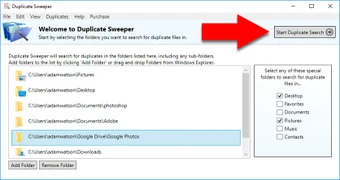
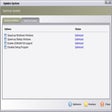
Experience Duplicate Sweeper from Wide Angle Software, a Windows utility that reclaims disk space by locating redundant files across internal and external drives. The tool scans file content rather than names, groups identical files for review, and offers a built-in previewer plus automatic selection rules for keeping newest or oldest copies. Integration with the system Recycle Bin and support for synced cloud folders help avoid permanent loss. It targets general users, photographers, and music collectors who manage large media libraries and need straightforward cleanup.

Top Recommended Alternative

What does the tool do for large media collections?

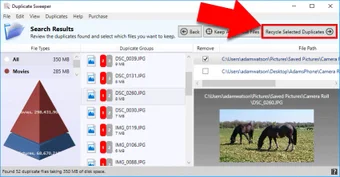
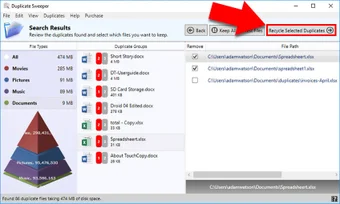
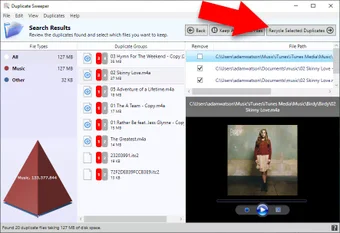
The tool identifies duplicate files by comparing file content rather than filenames, so identical files with different names are grouped for review. It supports photos, music, videos, and documents and includes a built-in previewer to inspect items before action. Automatic selection rules let you mark the newest or oldest file automatically, and the tool can scan external drives, USB sticks, and folders synced from cloud services.

Does it slow down your system during a scan?

The app uses a lightweight installer and targets desktop environments that support Microsoft .NET Framework 3.5 or higher, which keeps setup straightforward. In routine scans the footprint stays modest, but professional reviews note deep, content-based scans can be slower than some high-end competitors. Plan long deep scans for idle times when you do not need immediate disk access to avoid disrupting work.

Is it safe to remove duplicates with the app?

The app sends deleted items to the system Recycle Bin or Trash, providing a reversible deletion path and reducing risk from mistaken removals. Trial users can scan and examine candidate duplicates but cannot perform deletions until they move beyond the trial state. These design choices reflect a safety-first approach that minimizes permanent data loss during routine cleanup operations.

Do I need technical knowledge to use it?

The interface is described as suitable for non-technical users, so basic cleanup tasks can be handled without advanced skills. The grouped presentation of duplicates supports manual audits for experienced users who want finer control. A macOS counterpart is available, so users on both main desktop platforms can use similar workflows for media libraries and document folders.

Clear recommendation with one performance caveat

The app is a practical option for general users, photographers, and music collectors who need to remove duplicate files based on actual content rather than names. One trade-off is that deep, content-based scans can be slower than some high-end competitors, so schedule lengthy scans during idle hours. In summary, the tool performs reliably for users who need routine library cleanup and reversible deletions.


  • Pros

    • Content-based matching finds duplicates even when filenames differ
    • Built-in previewer lets you inspect files before action
    • Automatic keep-newest/keep-oldest rules speed large scans
    • Sends deleted items to the system Recycle Bin for recovery
  • Cons

    • Deep, content-based scans can be slower than high-end competitors
    • Trial version allows scanning and previewing but not deletions
    • Requires Microsoft .NET Framework 3.5 or higher on install
 0/4

App specs

Also available in other platforms

Program available in other languages


Icon of program: Duplicate Sweeper

Duplicate Sweeper for PC

  • Trial version
  • 5
    3
  • 2.5K
  • V1.90
Download for PC

View an ad to download for free


User reviews about Duplicate Sweeper

5

1 reviews

Add review

Main reviews for you

  • Malcolm

    A powerful little sweeper!

    I ran into trouble when migrating to a new PC - resulting in multiple copies of a lot of files. This handy app let me choose the folders I wanted to scan, found all my duplicates, and let me remove the ones I added last - keeping the original ones in place. I can't even imagine how long it would have taken me to manually look for the duplicates as well as picking the right ones to delete. Thank you!

More

You may also like

Alternatives to Duplicate Sweeper

Explore Apps

Latest articles

Laws concerning the use of this software vary from country to country. We do not encourage or condone the use of this program if it is in violation of these laws.
Softonic

Is Duplicate Sweeper safe?

100/100

Score result: Clean

This file passed a comprehensive security scan using VirusTotal technology. It is safe to download.

  • Virus free
  • Spyware free
  • Malware free
  • Verified by Security Partners

    VirusTotal logo

Scan Info

Last scan
Wednesday, November 15, 2023
Scan provider
VirusTotal · Full report

File Integrity

File
DuplicateSweeperSetup.exe
SHA256
9990d667e039fd957b3ae1f95390d4a53f87b78123b6ffc6744183da47e66b42
SHA1
1de6c8080a413a42613f164be1712666386e5f0c

Softonic security commitment

Duplicate Sweeper has been thoroughly scanned by our advanced security systems and verified by industry-leading partners. This file comes from the official developer and has passed all our security checks, showing no signs of viruses, malware, or spyware. For more information, visit our Security and Trust Center

Softonic

What is a Validated Developer?

Validated Dev

This badge indicates that Softonic has received authorization to offer the software from the developer or a designated representative, through the Softonic Publisher Center or other agreements. Content, ownership and compliance are responsibility of the developer.

More details in terms and conditions.

Are you a developer?

Join the Softonic Publishing Center and reach millions of users.

Not a developer?

Signed in to Softonic as